Audio Processing in Conversational AI: The Hidden Backbone of Voice Interactions
Siddharth Jhanwar
Conversational AI Engineer, Zoice
When we think about conversational AI, our minds often jump to powerful language models and natural-sounding voices. But what enables those fluid, human-like interactions is something more foundational — audio processing. It’s the critical bridge between raw sound and intelligible input for AI systems.
While most voice AI platforms abstract away much of this complexity, developers building sophisticated or custom solutions inevitably run into audio-related bugs, device quirks, and environmental constraints. This blog takes a detailed look into the audio input pipeline, exploring how audio travels from a user’s microphone to an intelligent response, with all the transformation steps in between.
1. Microphones and Automatic Gain Control (AGC)
Modern microphones — from those in smartphones to Bluetooth headsets — are marvels of hardware paired with layers of low-level software. These microphones often include automatic gain control, which dynamically adjusts input volume to compensate for distance or loudness variations.
While AGC is generally beneficial, it can introduce artifacts in edge cases. Worse, Bluetooth devices (especially on Windows and Android) can add hundreds of milliseconds of latency — a critical issue in real-time interactions. As a voice AI developer, you can’t always disable these features at the OS or hardware level. The best practice is to test audio capture across a range of real-world devices and platforms, and be wary of Bluetooth input unless latency tolerance is high.
2. Echo Cancellation: A Must for Open Microphones
When users speak into laptops or speakerphones (without headphones), audio from the speakers can loop back into the mic, creating echo and degrading both user experience and model performance.
This is where Acoustic Echo Cancellation (AEC) becomes crucial. AEC is latency-sensitive and must run on-device, not in the cloud. Thankfully, AEC is now embedded into WebRTC, telephony stacks, and browser SDKs like Chrome and Safari (though Firefox’s AEC still lags).
If you're building your own capture pipeline — such as in React Native with WebSockets — you’ll need to manually integrate echo cancellation. Otherwise, you risk unintelligible input and model confusion.
Key Insight
A detailed look into the audio input pipeline, exploring how audio travels from a user's microphone to an intelligent response, with all the transformation steps in between.
On this page
3. Noise Suppression and Speech Mode Optimizations
Most WebRTC and telephony pipelines default to "speech mode", which:
- Prioritizes narrowband audio (usually 8kHz–16kHz)
- Suppresses background noise like fan hums or distant chatter
- Compresses voice efficiently using codecs like Opus
For voice AI, this works well — but it's important to note:
- Telephony-grade audio (e.g., 8kHz G.711) sounds degraded to modern ears.
- WebRTC defaults (48kHz, Opus ≈ 32 kbps) strike a good balance for speech clarity.
- If you're sending music (e.g., in a lesson or podcast), turn off echo and noise suppression, enable stereo, and increase Opus bitrate to 64–128 kbps.
4. Audio Encoding: Compressing Voice for the Network
Encoding refers to how audio is formatted for transmission or storage. The choice of codec directly affects latency, bandwidth, and quality:
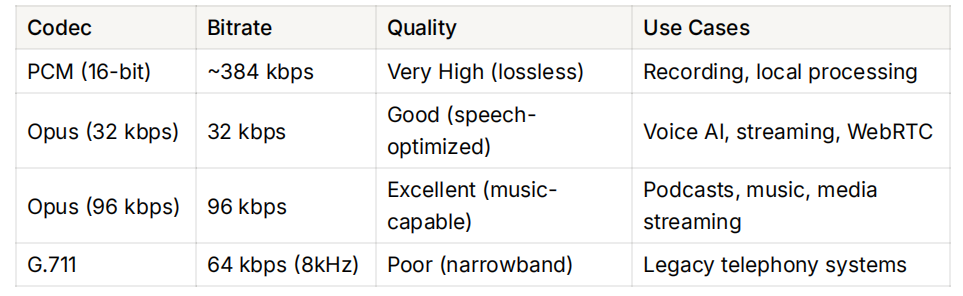
Opus is the de facto choice for modern voice AI. It was designed for real-time communication, adapts well across bitrates, and supports both speech and music. PCM, on the other hand, is uncompressed and often used when latency is more critical than bandwidth (e.g., local streaming to a model), but it's too bulky for internet transmission.
Core Components
Understanding hardware limitations, latency from Bluetooth, and the role of automatic gain control.
Why on-device AEC is critical for open-microphone setups and how it's integrated in modern SDKs.
How pipelines use speech mode, narrowband audio, and codecs like Opus to ensure clarity.
Comparing codecs like PCM, Opus, and G.711 for latency, bandwidth, and quality trade-offs.
The importance of primary speaker isolation to handle background speech for LLM-based agents.
How VAD enables turn detection, reduces compute costs, and improves user experience.
5. Server-Side Processing: From Noise Suppression to Speaker Isolation
While noise suppression is essential for human-to-human calls, LLM-based voice agents can often tolerate ambient noise thanks to robust speech-to-text models.
However, what they can’t tolerate is background human speech. This is where primary speaker isolation becomes crucial. In crowded or noisy environments — like airports, living rooms with a TV, or open offices — isolating the primary speaker can significantly improve transcription accuracy.
Leading solutions like Krisp offer enterprise-grade speaker isolation models. Though costly, their performance gains can more than justify the investment for commercial-scale deployments.
6. Voice Activity Detection (VAD): Knowing When to Listen
A Voice Activity Detector determines whether an audio segment contains speech or silence. This is vital for:
- Turn detection (e.g., when the user has stopped speaking)
- Reducing compute costs by avoiding unnecessary STT calls
- Improving UX by providing timely and contextually relevant responses
Modern VADs use deep learning and can distinguish speech even in noisy environments. In production pipelines, VAD is often coupled with smart buffering and context aggregation, forming the basis of natural-feeling back-and-forth conversations.
Implementation Roadmap
- 1Test audio input across a range of real-world devices and platforms
- 2Integrate on-device Acoustic Echo Cancellation (AEC), especially for open-mic applications
- 3Use efficient codecs like Opus, adapting bitrate for speech vs. music
- 4Implement Voice Activity Detection (VAD) for responsive turn detection
- 5Consider advanced server-side enhancements like primary speaker isolation for noisy environments
Putting It All Together: Designing Robust Voice AI Pipelines
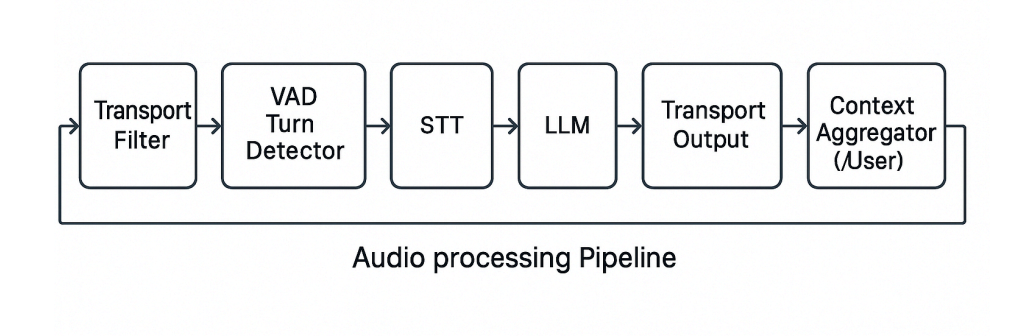
To deliver fast, natural, and accurate voice interactions, here’s what a production-grade audio pipeline must typically include:
- 🎤 Reliable audio input — test across platforms, minimize Bluetooth where possible.
- 🧹 Local echo cancellation and noise suppression — built into WebRTC, or integrated manually.
- 🎚 Efficient codecs like Opus — adapt bitrate based on use case (speech vs music).
- 🧠 VAD + Turn detection — for responsiveness and efficiency.
- 🛡 Optional enhancements — like Krisp for speaker isolation or OpenAI's new realtime noise filtering APIs.
Final Thoughts
Audio processing is often the most underappreciated yet impactful layer in conversational AI. You can have the best LLMs and TTS engines, but without a clean, timely, and accurately interpreted audio signal, your voice assistant will fumble.
By understanding the intricacies of microphones, codecs, signal processing, and environmental factors, developers can craft voice experiences that feel truly human — across diverse devices, languages, and contexts.
In a world where attention spans are shrinking and voice is becoming the default interface, investing in world-class audio processing isn’t optional — it’s essential.
Written by
Siddharth Jhanwar
Conversational AI Engineer, Zoice
Siddharth Jhanwar is an engineer at Zoice focused on the LLM layer of conversational AI — function calling, context management, prompt design, and reliable tool use inside real-time voice and chat agents. He writes about the practical engineering behind making AI agents accurate, fast, and production-ready for Indian businesses.
Keep reading
All articles
Ready to put an AI agent to work?
Deploy voice, WhatsApp, and chat agents across Indian languages — grounded in your knowledge and measured on every call.